
You paid somewhere between $500 and $1,500 for a professional building inspector to walk through your site. They took photos, measured things, cross-referenced standards, and wrote it all up. A few days later, a PDF landed in your inbox.
It’s probably still sitting in your downloads folder.
That’s not a criticism — it’s just what happens. Inspection reports are dense, technical documents, and unless you have a clear system for what to do with them, they tend to get buried. That gap between “report received” and “defects resolved” is where things quietly fall through.
Why PDFs fail you
The problem with a static PDF is that it has no memory. It can’t tell you what’s been fixed, what’s still open, or what’s urgent. You read it once, maybe highlight a few things, and then life moves on.
Call it the PDF graveyard. Defects don’t get forgotten because the inspector missed them — they get forgotten because the format makes them invisible over time. A 40-page report from a firm like Darbecca or Tyrells is genuinely thorough work. But if you can’t easily surface and track what’s inside it, the effort doesn’t translate into action.
There’s no status column. No way to assign a trade. No reminder when something still hasn’t been resolved three weeks later.
What a good inspection report actually contains
It helps to understand what you’re actually looking at when a report arrives.
A professional building inspection report typically organises defects by stage and location — frame, roof, wet areas, and so on. Each item usually includes a description of the issue, a reference to the relevant building code or Australian Standard (like AS 3740 for waterproofing), a severity rating, a recommended action, and at least one photo.
Most homeowners skim the executive summary and leave it there. But the detail is in the body of the report, and that’s where the important items live — things like subfloor ventilation gaps, missing noggins, or flashing that isn’t correctly lapped. These aren’t headline items, but they matter enormously once walls are closed.
Understanding the structure means you can read it systematically, not just reactively.
The gap between “found” and “fixed”
Getting the inspection done is the easy part. The harder part is follow-through.
Without a live tracking system, defects raised at frame stage can quietly disappear by lockup — not because they were fixed, but because no one checked. Most homeowners get 2–3 reports across their build (sometimes more, depending on the contract), and each one adds to the pile of things that need to be tracked. If you’re managing this across multiple PDFs with no central view, it’s genuinely difficult to stay on top of. The inspection stages explained guide covers what each report covers and when to commission them — worth reading alongside this one.
The real risk isn’t the defects that get found and fixed. It’s the ones that get found, noted, and then never followed up.
How to action your report properly
When the report arrives, read the whole thing the same day — not just the summary. You want to be familiar with what’s in it while the context is fresh.
From there, a practical approach:
Categorise by urgency. Structural issues and anything that will be hidden by subsequent work are highest priority. Cosmetic items can be addressed later. Waterproofing defects sit in a category of their own — they’re rarely visible until there’s a problem, so they need to be actioned before the build progresses past that stage.
Note which trade is responsible. Most defects have a clear owner — the framer, the plumber, the waterproofer. Getting that clear early makes follow-up conversations more direct.
Set a follow-up date for every open item. This sounds obvious, but most people don’t do it. Without a date, “I’ll check on that” becomes indefinite.
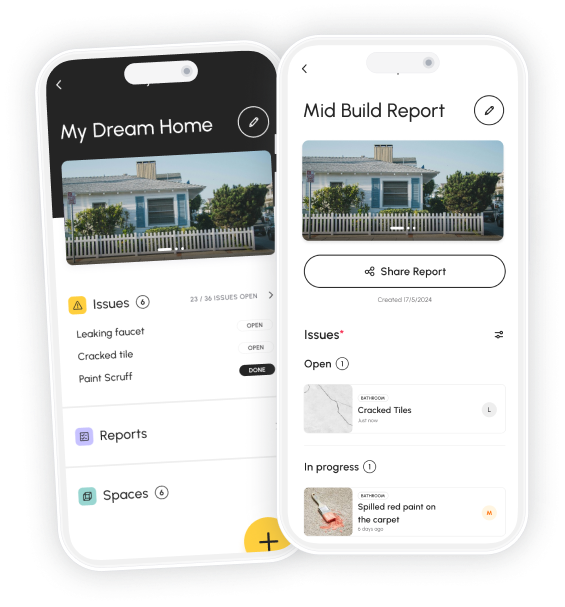
This is exactly the workflow that Checka’s Smart Import is built around. Upload your PDF inspection report, and the AI surfaces every defect into a structured list — each one linked to the relevant standard, with status tracking so you can see what’s open, what’s been actioned, and what still needs attention. Instead of a static document, you end up with a live ledger of your build.
What to prioritise first
Not every defect needs the same urgency. Here’s a simple way to think about it:
Fix immediately: Anything structural (connections, bracing, load-bearing elements), anything that will be concealed by the next stage of work, and anything affecting waterproofing or drainage. These have a closing window — once work progresses, rectification becomes expensive or impossible.
Schedule soon: Items that are visible and accessible but not immediately critical — things like incorrect fixings, missing seals, or substandard finishes on exposed surfaces.
Track but don’t rush: Cosmetic defects that are easy to document and don’t worsen over time. Paint, minor gaps, surface marks — these can be addressed at practical completion.
The main principle is this: the harder something is to fix later, the sooner it needs attention now.
Key takeaways
- A static PDF has no memory — defects get lost not because your inspector missed them, but because the format makes them invisible once the report is filed
- Read the full report on the day it arrives, not just the summary — the important items are usually in the body, not the executive overview
- Prioritise by what will be hidden next: structural and waterproofing defects have a closing window, cosmetic defects do not
- Every open item needs a follow-up date — without one, “I’ll chase that up” becomes indefinite and items quietly disappear
- Combine your inspector’s report with your own defect log for the most complete record — imported reports and your own additions together give you a full build history
- A properly actioned report is the foundation of any warranty claim — without dated, structured follow-up, your evidence is limited to the report date alone
Free resources to help you stay organised
If you don’t have Checka yet, these free templates will help you get started manually:
- Construction Defect Log — track every issue by stage, trade, and status
- Practical Completion Inspection Checklist — what to check at handover
- Defect Notice Letter Template — formally document issues in writing
Free to download
Stop losing track of defects.
Checka helps you capture issues, stay organised, and arrive at handover with a complete record of your build.