If you’ve ever received a building inspection report, you’ll know the feeling. A detailed PDF lands in your inbox — 20, 30, sometimes 50 pages of defects, photos, and code references. It’s thorough, professional work. And it’s completely static.
That’s the problem Smart Import is built to solve.
The PDF graveyard problem
Professional inspectors like Darbecca and Tyrells produce excellent reports. The issue isn’t the quality of the inspection — it’s what happens after. A PDF has no memory. It can’t show you what’s been resolved, what’s still open, or what’s been ignored. Every defect inside it is equally invisible.
Most homeowners end up managing their reports manually: re-entering defects into a spreadsheet, chasing their builder over email, and hoping nothing slips through the cracks. Some defects get followed up. Others quietly disappear.
If you’re managing multiple reports across the 5–9 stages of your build, this becomes genuinely difficult to stay on top of. If you’re unsure which stages are worth commissioning, our guide on building inspection stages explained covers exactly that.
What Smart Import does
Smart Import takes any PDF inspection report and does the heavy lifting for you.
Upload your report to Checka and our AI parses every defect out of the document — extracting the description, location, relevant building standard or installation guideline, and severity. Each defect is added to your issue ledger automatically. No manual re-entry. No copy-pasting between documents.
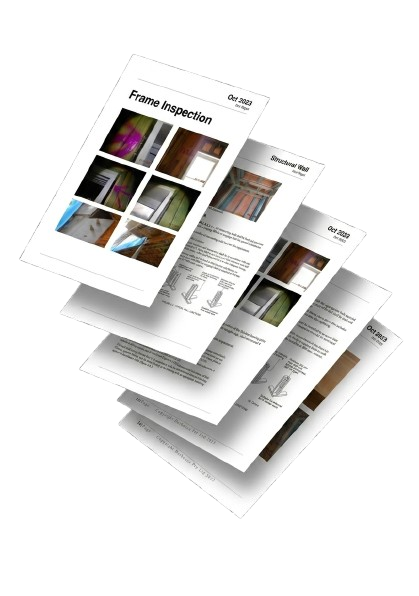 The PDF Graveyard
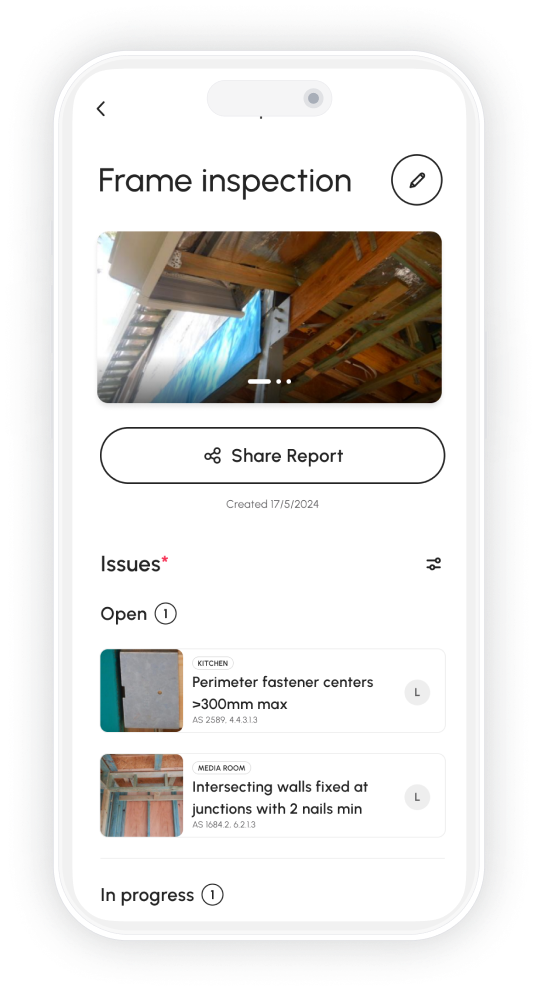 Checka Issue Ledger
What you end up with isn’t a copy of your PDF. It’s something better: a live, structured list of every issue your inspector found, each one linked to the relevant standards, each one with a status you can update as your build progresses.
From static to live
Here’s what changes when you move from a PDF to Checka’s ledger:
Every defect has a status. Open, In Progress, or Resolved — you can see at a glance what’s been attended to and what hasn’t. Nothing relies on memory or email threads.
Every defect is visible. Not buried on page 34 of a document you need to manually search. Surfaced, categorised, and ready to act on.
Every defect is linked to the standard. Building codes and installation guidelines are referenced automatically — so you know what the spec actually requires, not just that something looks wrong.
Every defect is trackable over time. As your builder works through items, you update the status. The ledger becomes a live record of your build — not a snapshot of one inspection day.
How it fits into your build
Smart Import works at every stage. Whether you’re uploading a frame inspection at the beginning of your build or a PCI report in the final weeks, each report feeds into the same ledger. Defects from different stages sit alongside each other, filterable by status, location, or severity.
That means if something was flagged at frame stage and still hasn’t been resolved by lockup, it’s visible. It hasn’t been buried by a new report. It’s still there, still open, still waiting.
If you’re not sure what to do once you have your report back, our step-by-step guide on actioning your building inspection report walks through the process in detail — including how to prioritise what needs immediate attention versus what can wait.
Built for homeowners, not project managers
Smart Import isn’t designed for people with construction backgrounds. It’s designed for homeowners who are building or renovating for the first time, who’ve received a report they find overwhelming, and who just need a clear, simple way to stay on top of things.
You don’t need to understand every code reference. You don’t need to manually categorise every defect. You just upload the PDF, and Checka does the rest.
What happens after import
Once your defects are in the ledger, the tracking workflow is straightforward. Open items show in your issue list. When your builder or their trades address something, you update the status to In Progress or Resolved. The ledger keeps a timestamped record of every change — so if something that was “resolved” reappears, you have the history.
You can also add your own defects alongside imported ones. Things you noticed on-site that didn’t make it into the report, or issues that developed after the inspection date, go into the same list. The full picture lives in one place rather than across a PDF, a spreadsheet, and a series of email threads.
For each item, you can attach additional photos, add notes, and generate a shareable summary to send directly to your builder. Everything your inspector documented plus everything you’ve tracked yourself, in a single coherent record.
The difference it makes
The test of any defect tracking system is what happens six months later. Are the open items still visible? Can you tell what was raised at frame stage versus PCI? Can you generate a clear list of outstanding items when you need to write a formal notice?
With a PDF, the answer to all three is usually no. With a live ledger, all three are immediate. Items have history. Stages are labelled. Outstanding items are filterable. A follow-up notice takes minutes to produce rather than hours of cross-referencing.
For a multi-stage build, that difference compounds over time. Each report adds to the ledger rather than sitting alongside it. By the end of the build, you have a complete defect history — not a folder of static documents you’re hoping covers everything.
Key takeaways
- A PDF inspection report has no memory — defects don’t get followed up because the format makes them invisible over time, not because the inspector’s work was poor
- Smart Import parses every defect from your PDF automatically: description, location, building standard reference, and severity — no manual re-entry
- The result is a live ledger with open/in-progress/resolved status tracking, so you can see at a glance what’s been attended to and what hasn’t
- Defects from multiple inspection stages feed into the same ledger, so nothing from frame stage gets buried when the PCI report arrives
- You can add your own defects alongside imported ones, attach photos, and generate a shareable summary to send directly to your builder
- The ledger gives you a complete, timestamped history of your build that holds up if disputes arise during the warranty period
Free to download
Stop losing track of defects.
Checka helps you capture issues, stay organised, and arrive at handover with a complete record of your build.